Interior design project management software from design to handover
Interior design project management software puts each project on one timeline, from design rounds and approvals through execution to handover. In the D&B Operating System, every task has an owner and a deadline, delays raise alerts, site updates arrive from the supervisor's phone and the snag list is closed before the final invoice. BRANDSWOT Consultancy built it for interior and design-and-build firms in India.
On this page
The problem: nobody can say which project is late
A firm with eight running sites usually has eight WhatsApp groups, a whiteboard and one project manager who carries the real schedule in their head. Design revisions pile up in email. The carpenter waits for a laminate decision nobody logged.
When the client asks when their kitchen will be ready, the honest answer is often a guess. And the owner hears about a two-week delay only when the client calls to complain.
The stages of an interior project
| Stage | What happens | What the system tracks |
|---|---|---|
| Design | Brief, measurements, moodboard, drawings, 3D renders | Design rounds with version history and client comments |
| Approval | Client signs off design and finishes | Approvals waiting, and who approved what |
| Agreement | Scope, milestones and payment terms fixed | Scope, payment schedule and change requests |
| Execution | Civil, electrical, carpentry, ceiling, paint, installation | Tasks, owners, deadlines, site updates, vendors and materials |
| Handover | Snags fixed, site cleaned, keys handed over | Snag list, final invoice and payment received |
Stage names can follow your firm's own process; these are the common ones.
How the interior design project management software works
- The signed agreement opens a project with its scope and milestones.
- The project manager sets stages and deadlines, then assigns tasks with due dates.
- Designers work on design rounds; each version and client comment is kept.
- Site supervisors post photo updates, material requests and issues from their phones.
- Delay alerts flag tasks running late, so the PM acts before the client notices.
- Change requests are recorded against the agreement before extra work starts.
- At handover, the PM closes the snag list and accounts raise the final invoice.
Who uses project management, and how
The workload view helps the owner see when one designer has six live projects and another has two.
- Project manager: timelines, tasks, site updates, client approvals, change requests, vendor and material status, snag list.
- Designer: only the projects they are on, with briefs, rounds and finish selections.
- Site supervisor: today's tasks for their site, nothing more.
- Owner: which projects are running late, approvals waiting and team workload at a glance.
What the client sees
Client comments and approvals are recorded against each design version, so decisions are on record rather than in a voice note. When they ask for progress, the PM has dated site photos to share at once. Everything carries your firm's brand, because the system runs on your own domain.
Getting faster design approvals
Slow approvals usually come from too many open choices. Show two or three options, not ten. Agree the number of design revisions in the agreement. Put each round in one thread with a clear question, such as approve the wardrobe shutter colour. In many Indian homes, several family members decide; ask early who has the final say.
Related client work
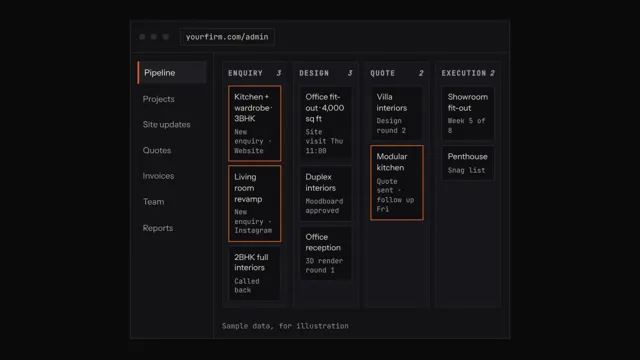 D&B Operating System
A project management app for every kind of interior and construction firm
Stages differ by trade, but every firm needs owners, deadlines and proof of progress. The D&B Operating System is set up with your own stage names, so the same project management app fits each of these firms.
| Type of firm | What the project timeline usually tracks |
|---|---|
| Turnkey interior contractors | Civil, electrical, carpentry, ceiling, paint and installation in one sequence |
| Home interior companies | Design sign-off, factory orders, site readiness and installation dates |
| Modular kitchen dealers | Measurement, design approval, production, delivery and fitting |
| Wardrobe and kitchen manufacturers | Orders from dealers or clients, through production to installation |
| False ceiling contractors | Framing, boarding, light cut-outs and finishing, area by area |
| Furniture and woodwork contractors | Carpentry tasks, polish and fixing on site |
| Architects | Design stages, approvals and site visits during construction |
| Civil contractors | Structure, masonry, plumbing and finishing stages |
| Renovation contractors | Demolition, repairs found on opening up, and approvals for extra work |
| Office fit-out companies and commercial interior contractors | Building approvals, after-hours work, services and fixed handover dates |
| Landscape designers | Hardscape, planting and irrigation stages |
| Lighting designers | Fixture selection, approvals, supply and commissioning |
| Real estate developers' interior teams | Show flats, common areas and many units on one dashboard |
Construction project management app for small contractors in India
Small contractors need something light. The D&B Operating System runs in the phone browser, so supervisors post site photos without installing anything, and the owner sees every project online. That makes it a cloud-based interior design project management software and a construction project management app with site photos in one.
It also works as turnkey interior project software. The signed agreement opens the project with its scope, milestones and payment schedule, so execution starts from what the client approved.
If you want an interior project tracking app for clients, know what is offered. Clients approve quote versions and comment on design rounds under your brand, and the project manager shares dated photos. Separate client logins to follow progress are not listed, so ask in the demo.
Vendor management for interior contractors, and a design approval workflow
Vendors and subcontractors cause many delays. Record each vendor against the project, with material status and bills, so the project manager sees what is ordered, pending and paid.
A design approval workflow needs three things: one version at a time, one clear question and a recorded answer. Design rounds in the D&B Operating System keep each version with the client's comments and approval. The carpenter then works from the signed-off design.
More questions
How do I make an interior project timeline?
Work backwards from the handover date. List the stages: design, approval, agreement, civil, services, carpentry, ceiling, paint, installation and snags. Add each stage's duration, material lead times and dependencies, then give every task an owner. Leave a buffer for approvals. The interior project timeline template in the D&B templates library gives you a starting format.
How do I get daily updates from site supervisors?
Make the update small and fixed: work done today, photos, labour on site, materials needed and any issue. Ask for it at the same time each day. A paper format works, but a phone-based update reaches the office at once. In the D&B Operating System, supervisors post photos, material requests and issue flags from the phone browser.
How do I share site progress photos with clients?
Send a short, regular update rather than random photos. Pick three or four dated photos per visit, with one line on what was done and what comes next. Share them at a fixed rhythm, such as weekly. In the D&B Operating System, photos sit under each project, so the project manager can find the right ones quickly.
How do I reduce material wastage on sites?
Order from an approved BOQ, not from memory. Measure twice before cutting board or laminate, and plan sheet cuts for carpentry. Have supervisors raise material requests instead of buying on the spot, and store stock securely on site. Compare material bought against the BOQ at each stage. Vendor bills recorded per project show where costs run over.
How do I manage contractors and vendors?
Agree scope, rates and dates in writing before work starts. Give each vendor or subcontractor one contact at your firm. Track orders, deliveries and bills against the project, and pay against measured work. In the D&B Operating System, project managers see vendor and material status, and accounts record vendor bills against each project.
How do I manage labour attendance on site?
Record attendance on site every day, not from memory at the end of the week. List each worker or crew, their trade and hours, and note who is absent. Link attendance to the tasks done that day. In the D&B Operating System, site supervisors log labour and attendance from their phone, and owners see workload and attendance in one view.
How do I get faster client approvals on designs?
Set a decision date for each design round, and tell the client what waits on it, such as factory production. Send options as one clear question. Book short review calls instead of long chat threads. Track approvals waiting on your dashboard, so the project manager chases them before they hold up the site.
What should a handover checklist include?
A handover checklist should include a room-by-room snag check and tests of electrical points, plumbing and appliances. Add a cleaning check, warranties, manuals, spare keys and any agreed extras. Add the final invoice and the client's sign-off. Take dated photos at handover. The D&B templates library has a handover checklist you can adapt.
How do I collect feedback after project completion?
Ask within a week of handover, while the experience is fresh. Use a short form or a call with three questions: what went well, what could be better, and would they recommend you. Fix any open issues first. If the client is happy, ask them to share an honest review. Feed what you learn back into your timelines and quotes.
How do I manage a remote team in an interior firm?
Agree one place for every update instead of five chat groups. Give each person a role, a daily task list and a fixed time for updates. Hold a short daily call on late tasks only. In the D&B Operating System, roles limit what each person sees, site updates arrive with photos, and delay alerts show what needs attention.
What roles does an interior design firm need?
Most firms need five roles, even if one person holds several: owner, project manager, designer, site supervisor and accounts. Larger firms add sales, purchase and a design lead. Write down what each role decides and owns. The D&B Operating System has owner, project manager, designer, site supervisor and accounts roles with tiered permissions.
Questions people ask
How do I manage interior design projects?
Break every project into stages, give each task an owner and a due date, and keep all decisions in one place. Review late tasks every morning. D&B Operating System puts each project on a timeline from design to handover, with task owners, delay alerts, site updates and the snag list together.
How long does an interior project take in India?
It depends on scope, approvals and material lead times. A single room can take a few weeks, while a full home or office fit-out takes months. The biggest delays usually come from late design approvals and materials ordered late. A written timeline with stages and deadlines keeps both sides honest.
How do I manage design revisions?
Save every design round as a version with a date, and keep client comments attached to that round. Agree in writing how many revisions the fee includes and what counts as a fresh design. D&B Operating System keeps design rounds with version history and comments in one thread.
What is a snag list and how do I use it?
A snag list records small defects found before handover, such as a misaligned shutter, a paint patch or a loose handle. Walk the site room by room, list each snag with a photo and an owner, then fix and tick it off. In D&B Operating System, the PM closes the snag list before the final invoice.
How do I give team members access to only their projects?
Use role-based permissions. In D&B Operating System, owners see everything, project managers see their sites, designers see only the projects they are on, and site supervisors see their site's tasks. Tiered roles and permissions mean you decide who sees money and client details, and the owner keeps the full view.
Is there an interior design client portal?
D&B Operating System tracks design approvals and quote versions the client approves, with client comments kept in one thread, all under your brand on your own domain. The product page does not describe a separate client app. Ask in the demo which client-facing views your plan includes.
Does it have a Gantt chart for interior projects?
Each project runs on a timeline with stages, deadlines, task owners and delay alerts. The product page does not promise a specific Gantt layout, so ask to see the timeline view in the 20-minute demo. The templates library also has an interior project timeline template you can use today.