Track leads, follow up and win design approvals
To track interior design leads, put every enquiry in one list with its source, project type, budget band, stage and next follow-up date, and check that list every morning. Follow up on a fixed rhythm, get each design round approved in writing, and send clients a short weekly progress note. A shared sheet and WhatsApp can handle this for a small firm.
On this page
Track every lead in one list, not five chats
Interior enquiries arrive from Instagram DMs, WhatsApp, website forms, builder referrals and walk-ins at the experience centre. The leak is rarely the lead itself. It is the lead nobody wrote down.
- Create one shared Google Sheet with columns: date, name, phone, source, property type (2BHK, villa, office), carpet area, budget band, stage, owner, next follow-up date.
- Agree five stages only: New, Site visit booked, Design, Quote sent, Won or Lost.
- Make one person responsible for adding every enquiry within an hour, whatever the channel.
- Sort the sheet by next follow-up date each morning and work from the top.
- Record the reason for every lost lead, such as price, timing or chose a contractor, so you can spot patterns each month.
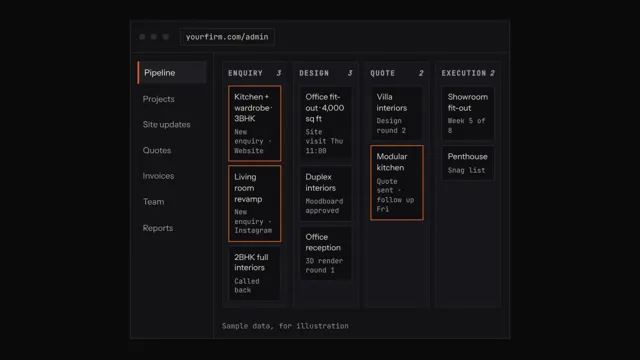
In the D&B Operating System, each enquiry is captured with its source, stage and next follow-up date, and the owner sees pipeline value and conversion by stage.
Follow up on a rhythm the client expects
Homeowners compare three or four firms. The one that follows up clearly and on time often wins, even at a similar price.
- Reply to a new enquiry the same day with two site-visit slots, not a price list.
- After the site visit, send a WhatsApp summary of what you measured and what happens next.
- After sending a quote, follow up on day 2, day 5 and day 10, each time with something useful: a material sample photo, a timeline, or an answer to their question.
- Log every follow-up in the sheet and set the next date before you close the chat.
- After the third unanswered follow-up, mark the lead Cold and revisit it in 60 days.
The D&B Operating System keeps client history in one place and sends follow-up reminders, so nobody has to rely on memory.
Get design approvals in writing, round by round
Most disputes start with a design the client says they never approved. A clear approval trail protects your margin and your timeline.
- Agree in the design brief how many revision rounds are included.
- Name each file with project, room, round and date, for example Kumar-Kitchen-R2-12Oct.
- Send the design as a PDF with a short list of what changed since the last round.
- Ask the client to reply Approved on WhatsApp or email, and save a screenshot to the project folder.
- Do not release a design to the factory or site until that written approval is saved.
In the D&B Operating System, design rounds carry version history and client comments sit in one thread, so the approved version is never in doubt.
Share progress with clients before they ask
Clients who hear nothing for a week start calling the site supervisor directly. A fixed weekly update stops that and builds trust for the final payment.
- Pick a fixed day, for example every Saturday evening.
- Send four to six site photos with one line each on what was done.
- List what happens next week and any decision you need from the client.
- Flag delays early with the reason and the new date.
- Keep updates in one WhatsApp group per project with the client, project manager and designer only.
With the D&B Operating System, supervisors post photo updates from the site on their phone and the office sees them straight away, ready for the weekly client note.
Signs you have outgrown the spreadsheet
At that point, one system for leads, designs and site updates saves more time than it costs to set up. The D&B Operating System by BRANDSWOT Consultancy is one option, now in early access with pricing on request.
- Two people follow up the same client, or nobody does.
- You cannot say how many leads came from Instagram last month.
- Approved designs live in personal phones.
- Clients ask for updates that the office does not have.
Related client work
 D&B Operating System
Questions people ask
How do I track interior design leads in an interior design firm?
Log every enquiry in one shared list with its source, property type, budget band, stage, owner and next follow-up date. Make one person responsible for adding leads from all channels, and review the list by follow-up date every morning.
What is the easiest way to track interior design leads?
A single shared Google Sheet with five stages and a next follow-up date column is the easiest start. Once you handle more than a few dozen open leads, move to a CRM that reminds the team automatically.
How do I follow up with leads in an interior design firm?
Follow up on a fixed rhythm, such as day 2, day 5 and day 10 after the quote, and add something useful each time. Log each follow-up and set the next date before closing the chat.
What is the easiest way to follow up with leads?
Set the next follow-up date every time you speak to a lead, and work from a list sorted by that date. WhatsApp quick replies help, but the date column is what stops leads going cold.
How do I get design approvals in an interior design firm?
Send each design round as a dated PDF with a list of changes, and ask the client to reply Approved in writing. Save that reply to the project folder before anything goes to the factory or site.
What is the easiest way to get design approvals?
Ask for a one-word written approval on WhatsApp or email for each round and save a screenshot with the file. Agreeing the number of revision rounds in the brief keeps approvals moving.
How do I share progress with clients in an interior design firm?
Send a weekly update on a fixed day with site photos, one line on each, next week's work and any decisions needed. Flag delays early with the reason and the new date.
What is the easiest way to share progress with clients?
One WhatsApp group per project with a fixed weekly photo update is the easiest method. Ask site supervisors to send photos to the office daily so the update is ready without a site visit.